About WiFi Strength Meter & Analyzer
Weak WiFi is a solvable problem — if you can see it. WiFi Strength Meter is a complete toolkit for measuring, mapping and fixing your wireless network: live signal readings, real speed tests, a room-by-room coverage...
Weak WiFi is a solvable problem — if you can see it. WiFi Strength Meter is a complete toolkit for measuring, mapping and fixing your wireless network: live signal readings, real speed tests, a room-by-room coverage heatmap, channel analysis, security monitoring and connectivity tracking, all in one app.
KEY FEATURES
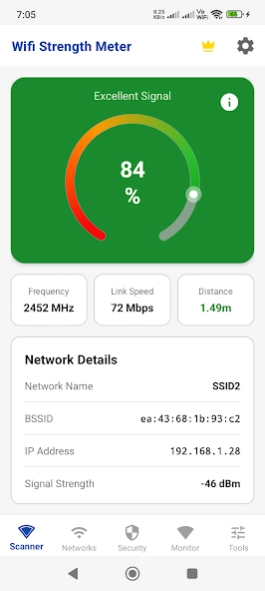
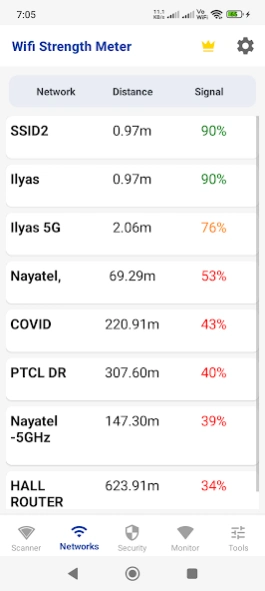
• Signal meter — live WiFi signal strength in dBm for your network and every network around you, with detail views per network
• Speed test — download, upload, ping and jitter, with a full history so you can prove whether your connection got better or worse
• WiFi heatmap — walk your home taking readings and build a coverage map that shows exactly where the signal dies
• Channel analyzer — see crowded channels and neighbor overlap, then move your router to a cleaner one
• Device scanner — list the devices connected to your network and spot ones you do not recognize
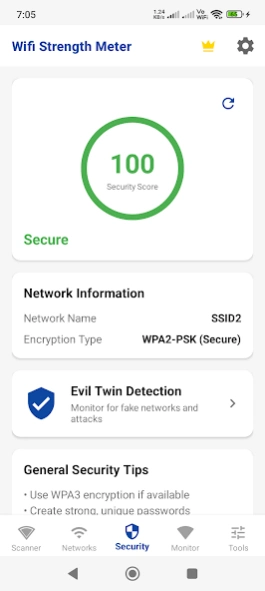
• Security scanner with evil twin alerts — get warned when a suspicious network imitates one you trust
• Trusted networks — mark your safe networks so alerts stay meaningful
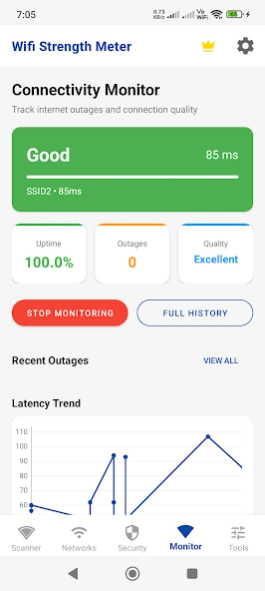
• Connectivity monitor — background tracking of drops and outages, with daily stats and an outage history
• DNS test and router login shortcut for quick diagnostics and settings access
• WiFi password strength checker
• Network history with charts, plus practical WiFi guideline articles
• Dark mode, CSV and PDF export (premium), and notification alerts you control
AN HONEST NOTE
Signal readings come from your phone's WiFi hardware, so absolute values vary between devices — trends and comparisons are where the meter shines. The heatmap reflects the readings you take as you walk. Android requires the location permission for WiFi scanning; this app uses it for scanning and the features described here.
WHY CHOOSE WIFI STRENGTH METER
• Measurement, mapping, speed and security in ONE app instead of four
• The heatmap turns "the WiFi feels slow upstairs" into a picture you can act on
• Outage tracking gives you evidence for your ISP, not just a feeling
• Evil twin detection watches for a real and underrated WiFi attack
• Your scan data stays on your device, and premium exports it to CSV or PDF
PREMIUM
A premium upgrade removes ads, unlocks unlimited history and CSV/PDF export, shows every device the device scanner finds (the free version lists five) and opens every tool without an ad. The core meter, channel analyzer and speed test require no purchase.
PERFECT FOR
• Placing a router, mesh node or extender where it actually helps
• Renters and buyers checking coverage before committing to a home or office
• Gamers and remote workers hunting down lag, drops and dead zones
• Anyone who suspects their ISP is not delivering the promised speeds
• Privacy-conscious users watching for rogue access points and unknown devices
Map it, measure it, fix it — your WiFi has nowhere left to hide.
Previous Versions
Here you can find the changelog of WiFi Strength Meter & Analyzer since it was posted on our website on 2019-11-05 18:12:29.
The latest version is 2.6 and it was updated on 2026-10-12 16:15:32. See below the changes in each version.
WiFi Strength Meter & Analyzer version 2.6
Updated At: 2026-09-29
Changes: • Plan speed and price accept a comma: 1,000 Mbps is read as a thousand, and 29,99 as a decimal price
WiFi Strength Meter & Analyzer version 2.5
Updated At: 2026-09-25
Changes: • Outages are now closed correctly after the app restarts, so downtime and ISP claims are accurate
• Outage detection keeps working after the app is closed
• Speed test results are no longer about 5% too low, and failed tests are not saved
• Uptime shows -- until there is data
• Pro purchases are restored reliably
WiFi Strength Meter & Analyzer version 2.2
Updated At: 2026-09-18
Changes: • Refreshed the input fields with Material styling for a cleaner, more consistent look.
WiFi Strength Meter & Analyzer version 2.1
Updated At: 2026-09-11
Changes: • Minor layout and stability improvements.
WiFi Strength Meter & Analyzer version 2.0
Updated At: 2026-08-31
Changes: New ISP claim report — turn your outage log into a dated record you can send to your provider.
Set your billing cycle, provider and plan to see outages and uptime for each billing period.
Share the claim as a PDF.
WiFi Strength Meter & Analyzer version 2.0
Updated At: 2026-08-23
Changes: • Settings are now grouped into sections, so options are easier to find
WiFi Strength Meter & Analyzer version 2.0
Updated At: 2026-08-12
Changes: • Screen titles are now translated in all 23 languages — Speed Test, Heatmap, Router Login, Password Checker and the rest no longer show in English.
• Upgrading no longer erases your saved heatmap projects, trusted networks or security alert history.
• Fixed back navigation between screens.
• Updated Firebase and internal components for better stability.
WiFi Strength Meter & Analyzer version 2.0
Updated At: 2026-07-31
Changes: New: quick access to our free web tools from Settings. Stability improvements.
WiFi Strength Meter & Analyzer version 2.0
Updated At: 2026-07-21
Changes: - Multi language support added
WiFi Strength Meter & Analyzer version 2.0
Updated At: 2026-03-01
Changes: Advance Network Tools, Premium Feature, Contact us, Navigation & UI improved
Disclaimer
Official Google Play Link
We do not host WiFi Strength Meter & Analyzer on our servers. We did not scan it for viruses, adware, spyware or other type of malware. This app is hosted by Google and passed their terms and conditions to be listed there. We recommend caution when installing it.
The Google Play link for WiFi Strength Meter & Analyzer is provided to you by apps112.com without any warranties, representations or guarantees of any kind, so access it at your own risk.
If you have questions regarding this particular app contact the publisher directly. For questions about the functionalities of apps112.com contact us.